
First Person Tennis


First Person Tennis – The Real Tennis Simulator – Free Download – PC Game
Game Info:
Size: 883 MB
Genre: Sports
Release Date: 11 Apr, 2019
Developer: Mikori Games
Publisher: Mikori Games
About This Game:
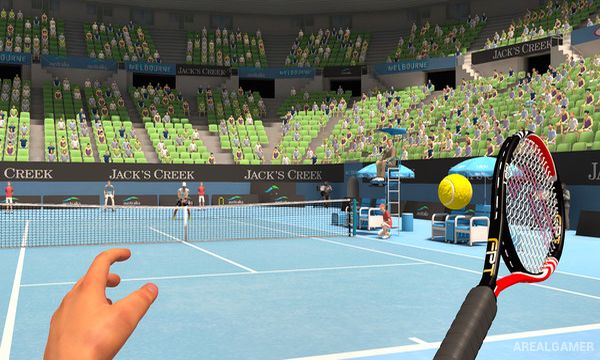
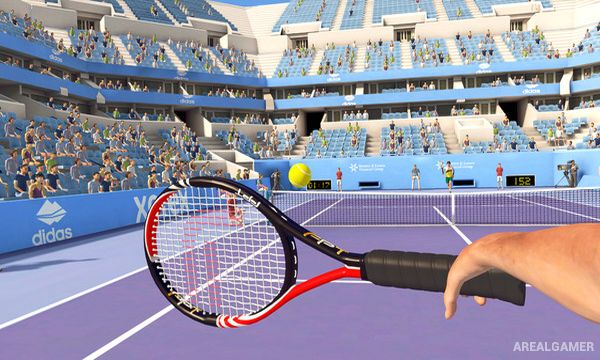
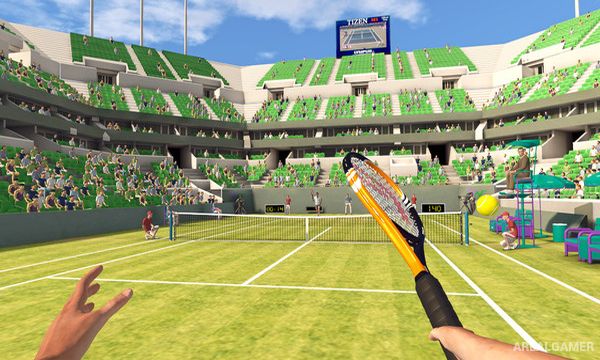
First Person Tennis is a tennis simulation designed to reproduce the sport from an on-court perspective rather than using the elevated camera found in most tennis games. It can be played as a conventional first-person tennis game and is also strongly built around virtual reality motion controls.
The focus is on physically believable ball behavior and direct control over serves, forehands, backhands, volleys, and shot placement. Different courts and opponents provide a range of match situations for players who want a more simulation-oriented approach to tennis.
How the Gameplay Works
In VR, the controller acts as the racket and players swing naturally to determine the timing, direction, and type of shot. Movement settings can be adjusted depending on available space and player comfort, while non-VR controls provide an alternative way to play on a monitor.
Matches follow standard tennis rules with serves, rallies, games, sets, and court boundaries. Difficulty options and opponent strength allow players to practice basic timing before dealing with quicker serves and more demanding rallies.
Main Gameplay Features
First-person tennis simulation
Virtual reality support
Motion-controlled racket swings
Forehands, backhands, serves, and volleys
Physics-based ball movement
Multiple court surfaces
Adjustable difficulty
Singles tennis matches
Non-VR play option
Screenshots:
Minimum System Requirements:
OS: Windows 7/8/10, 64-bits
CPU: 2.66 GHz Intel Core 2 Quad Q8400, 3.0 GHz AMD Phenom II X4 940
RAM: 4 GB
Video Card: NVIDIA GTX 1060 / RADEON RX 580
Space Required: 3 GB
DirectX: 11
How to Install:
Extract the game using Winrar or 7zip.
Open “First Person Tennis” folder, double click on “Setup” and proceed install.
After installation complete, open “SKIDROW” folder.
Copy all files and paste it where you “Installed the Game”.
Double click on “Game” icon to play the game. Enjoy!
Click the Below Button to Proceed to Download Page
File Password: arealgamer