
Overcrowd: A Commute ‘Em Up


Overcrowd: A Commute ‘Em Up – Free Download – PC Game
Game Info:
Size: 439 MB
Genre: Simulation
Release Date: 6 Oct, 2020
Developer: SquarePlay Games
Publisher: SquarePlay Games
About This Game:
Overcrowd: A Commute ‘Em Up is a management simulation about designing and operating busy underground railway stations. Players must create efficient layouts that move large numbers of commuters through entrances, ticket barriers, platforms, facilities, and train services without allowing the station to descend into chaos.
Successful stations need more than tracks and platforms. Lighting, ventilation, power, staffing, signs, shops, waste disposal, security, and passenger comfort all affect how smoothly the transport system operates.
How the Gameplay Works
Players excavate underground space and place corridors, staircases, elevators, turnstiles, platforms, utilities, and passenger facilities. Commuters then navigate the station according to the layout, making bottlenecks and poorly placed services visible during busy periods.
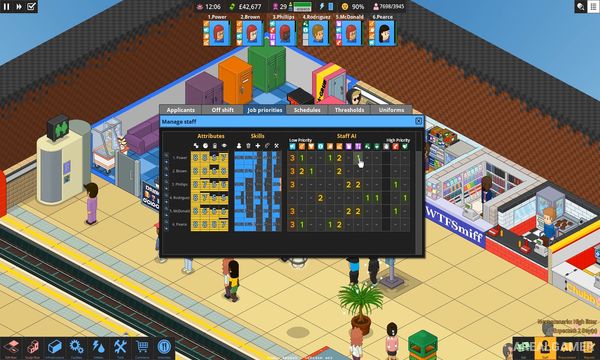
Staff members can be hired and assigned duties such as cleaning, maintenance, security, and helping passengers. As stations become larger, players must balance finances with capacity while dealing with overcrowding, equipment failures, power demands, and environmental conditions.
Main Gameplay Features
Underground station construction
Passenger-flow management
Platform and railway planning
Staff hiring and job assignments
Power and ventilation systems
Shops and passenger facilities
Crowd bottleneck management
Station expansion and financial management
Screenshots:


Minimum System Requirements:
OS: Windows 10
CPU: i5 or equivalent
RAM: 4 GB
Video Card: Desktop nvidia GTX 960 4gb or equivalent (integrated GPUs/lower spec mobile laptop GPUs not supported)
Space Required: 500 MB
DirectX: 9.0c
How to Install:
Extract the game using Winrar or 7zip.
Open “Overcrowd: A Commute ‘Em Up” >> “Game” folder.
Double click on “Game” icon to play the game. Enjoy!
Click the Below Button to Proceed to Download Page
File Password: arealgamer