
Samurai Jack: Battle Through Time


Samurai Jack: Battle Through Time – Free Download – PC Game
Game Info:
Size: 3.80 GB
Genre: Action, Platform
Release Date: 21 Aug, 2020
Developer: Soleil Ltd.
Publisher: Adult Swim Games
About This Game:
Samurai Jack: Battle Through Time is an action game based on the animated series, sending Jack through locations and periods connected to his long struggle against Aku. The story takes place during the series finale and creates an alternate adventure involving familiar allies, enemies, and worlds.
Its campaign moves between varied settings inspired by different episodes while preserving Jack’s fast swordplay and stylized presentation.
How the Gameplay Works
Players combine light and heavy attacks, dodges, blocks, counters, and special moves while fighting groups of enemies. Jack can use his katana as well as additional swords, spears, clubs, bows, firearms, and other weapons found throughout the journey.
Combat skills can be improved through upgrade trees, and different weapons have their own strengths and durability. Levels also contain collectibles, side encounters, familiar characters, and challenging boss fights.
Main Gameplay Features
Fast third-person melee combat
Jack’s magical katana and additional weapons
Ranged weapons including bows and firearms
Blocking, dodging, counters, and combos
Multiple character upgrade trees
Locations and characters from the animated series
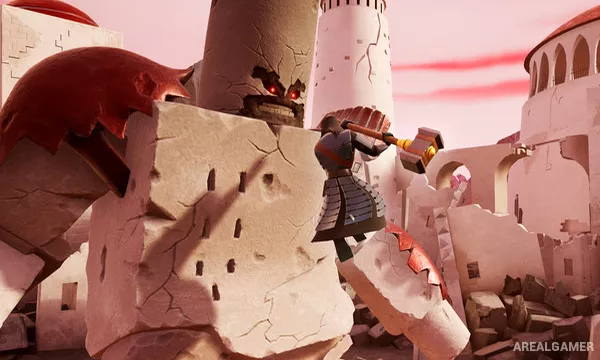
Large enemy encounters and boss battles
Screenshots:


Minimum System Requirements:
OS: Windows 7/8/10, 64-bit
CPU: Intel Core i5 3rd Generation
RAM: 8 GB
Video Card: NVIDIA GeForce GTX 750 Ti or AMD Radeon HD 7750
Space Required: 10 GB
DirectX: 11
How to Install:
Extract the game using Winrar or 7zip.
Open “Samurai Jack Battle Through Time” folder, double click on “Setup” and proceed install.
After installation complete, open “HOODLUM” folder.
Copy all files and paste it where you “Installed the Game”.
Double click on “Game” icon to play the game. Enjoy!
Click the Below Button to Proceed to Download Page
File Password: arealgamer